Spaghetti in the Cloud

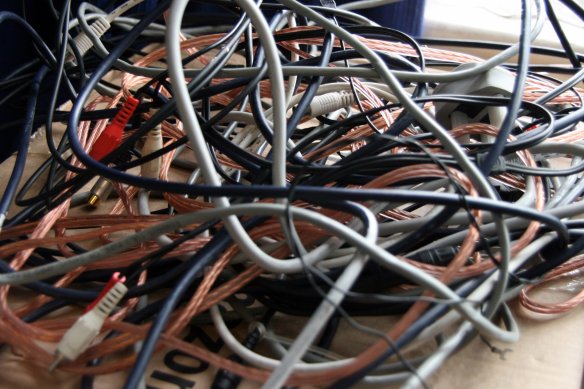
The combo of Cloud+Wireless+Mobile has transformed the way I work. For one thing, storing, accessing and sharing documents is now so much easier than having to send everything as bulky e-mail attachments tethered to a hard drive. However, as an independent consultant, with every new project, business or client I work with, I find I need to use different collaboration tools to be compatible with their workflow, IT systems or platform preferences. Great as all these collaborative apps are, the fact that many don’t talk to one another makes it feel like I am being sucked into a mess of virtual cables that don’t interconnect. Sort of “Spaghetti in the Cloud”.

Image sourced from Flickr

It feels like all my apps are unconnected yet tangled up in the Cloud (Image sourced from Flickr)

There is definitely a battle to dominate enterprise collaboration, with Facebook’s recent launch of Workplace to compete with the likes of Slack, the anticipated revamp of Microsoft’s Office 365 Groups when Yammer is decommissioned in early 2017, and Atlassian’s own HipChat. But aside from enterprise social media and chat, there is now competition across multiple collaboration tools. Here is a list of just a few of the productivity apps I have been exposed to across the various projects I work on:

Meetings/Chat

  • Skype for Business (formerly Lync)
  • Google Hangouts
  • Zoom
  • Cisco WebEx for iOS
  • GoToMeeting
  • Fuze
  • Join.Me
  • WhatsApp

Project Management

  • Samepage
  • Mightybell
  • Basecamp
  • Trello
  • Smartsheet

Document/File Management

  • Dropbox
  • OneDrive
  • Google Drive
  • FileApp (iOS)
  • FileManager Pro (iOS)
  • Docs To Go (iOS)

Productivity

  • Google Docs
  • Apple iWork
  • Microsoft Office 365
  • SlideShark

CRM

  • SalesForce
  • Insightly
  • Streak

And this list doesn’t include single-purpose apps like POP, Simplist and Ideament that allow some project sharing; the entire suite of creative, social media, blogging and CMS tools that organisations increasingly embrace as enterprise solutions; and the growing number of apps that support text, photo and video editing on mobile devices.

While some of these tools support content, file, document and even project sharing from within the app, a lot of functionality is native, and therefore embedded, and is not transferable. So I end up having to learn (and unlearn) the features, quirks and limitations of each one, project by project, client by client.

As I have written before, based on my experience of creating digital music (plus using and beta-testing iOS apps), an app like Audiobus set the standard for product compatibility and content integration. So much so, that Apple ended up supporting Inter-App Audio as a new standard for iOS. Since Audiobus, similar apps have emerged that allow audio and MIDI apps to run together on a single device, and to share/stream content between different mobile devices and desktop DAWs (Digital Audio Workstations): Midiflow, musicIO, AudioShare, AudioCopy, Audreio, studiomux etc.

If only enterprise software and productivity app developers would have a similar approach to product design and collaboration….

Next week: StartupVic’s Pitch Night for October


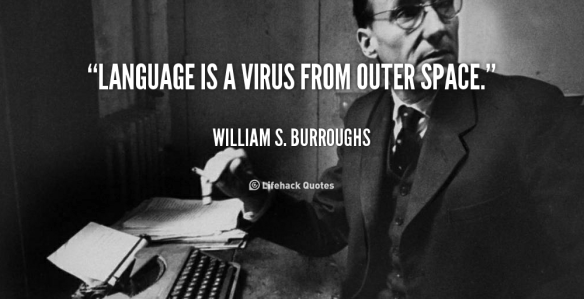
“Language is a virus” – a look at coding skills

We are fast-approaching the point when a lack of some basic coding skills will be likened to being illiterate. If you are unable to modify a web page or use an HTML text editor, it will be like not knowing how to create a Word document or edit a PDF file. Coding does appear on some school curricula, but it is primarily taught in the context of maths, computer programming or IT skills. Whereas, if we look at coding as a language capability (part of a new literacy), it should be seen as an essential communication tool in itself.

quote-William-S.-Burroughs-language-is-a-virus-from-outer-space-92713First, I am aware that a number of programs for children are trying to teach coding and maths in more relevant ways, and having talked to some of their creators, I admire their ambition to place these skills in a broader context. Coding might be described as the “4th R”: alongside reading, writing, arithmetic we have reasoning”. So a program like Creative Coding HK (as it name implies) focuses on students making things; in the USA, KidsLogic is placing as much emphasis on contextual learning as on robotics; while Australia’s Machinam is re-writing the maths curriculum to teach practical, everyday problem-solving skills.

Second, as we know, learning the foundations of coding is like learning the syntax of a foreign language. However, while Latin and Greek can provide the basis for learning the structure (and many words) of many European languages, it’s not much use when learning character-based languages (Chinese, Japanese) – although there are common grammatical elements. But if we understand that a line of any code has to be structured a certain way, contain essential elements, define key attributes and run in a particular sequence or order, we may come to “read” and interpret what the code is saying or doing.

As an aside, I’m struck by the comments made by the founder of AssignmentHero during a recent pitch night. Although he had studied computer sciences at Uni, he did not use any of the formal computing languages he had learned when building his product. This highlights the downside of learning specific languages, which can become obsolete, unless we have a better grasp of “which languages for which purposes”, or find ways to easily “interpolate” components of one language into another (just as languages themselves borrow from each other). Or do we need an Esperanto for coding?

Third, even if I don’t want or need to learn how to program a computer or configure an operating system, knowing how to define and sequence a set of instructions for running some software or a dedicated program will be essential as more devices become connected in the Internet of Things. For myself, I have dabbled with a simple bluetooth enabled robot (with the original Sphero), acquired a WiFi-enabled light bulb (the programmable LIFX) and experimented with an iOS music app that incorporates wearables (the MIDI-powered Auug motion synth).

Finally, just like a virus, coding is contagious – but in a good way. At a recent event on Code in the Cinema (hosted by General Assembly as part of the Melbourne International Film Festival), there were three demos which captured my attention, and which I will be investigating over the coming months:

I think they show why, where and how many of us “non-computing” types will want to learn the benefits of coding as a new language skill. If nothing else, getting comfortable with coding will help mitigate some of the risks of the “digital divide”.

Next week: The arts for art’s sake….

Deconstructing #Digital Obsolescence

Remember the video format wars of the 1980s? At one point, VHS and Betamax were running neck and neck in the consumer market, but VHS eventually won out (although the also-ran V2000 was technically superior to both). Since then, we’ve had similar format battles for games consoles, video discs, computer storage, CD’s and e-books. It’s the inevitable consequence of operating platforms trying to dominate content – a continuing trend which has probably reached its apotheosis with the launch of Apple’s Beats 1 streaming service. This convergence of hardware and software is prompting some contrary trends and, if nothing else, proves our suspicion of hermetically sealed systems…
about-format2

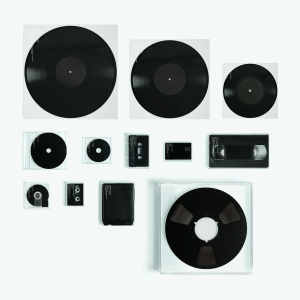
Trevor Jackson embarks on a format frenzy….

1. Digital Divergence

Earlier this year, UK music producer Trevor Jackson released a collection of 12 songs, each one pressed on a different media format: 12″, 10″ and 7″ vinyl; CD and mini-CD; cassette; USB; VHS; minidisc; DAT; 8-track cartridge; and reel-to-reel tape. Of course, he could have also used 78 rpm shellac records, digital compact cassettes, Digital8 tapes, 3.5 and 5.25 inch floppy disks (still available, I kid you not) or any of the multitude of memory cards that proliferate even today.

While Jackson’s “Format” project might seem gimmicky, it does demonstrate that many digital formats are already obsolete compared to their analogue counterparts (and until very recently, I could have played 8 of the 12 formats myself – but I’ve just donated my VHS player to our local DVD store).

As I have blogged previously, there is an established body of digital/analogue hybrids, especially in data storage, and I can only see this continuing as part of the creative tension between operating systems and content formats.

2. Digital Archeology

Each new hardware/software upgrade brings a trail of digital obsolescence (and a corresponding amount of e-waste). It’s also giving rise to a new discipline of digital archeology, combining forensics, anthropology and hacking.

Back in 2002, it was discovered that a 15-year old multimedia version of the Domesday book was unreadable* – yet the hand-written version is still legible, and available to anyone who can read (provided they can decipher 1,000-year old Norman English). Apparently, it has taken longer to decrypt the 1986 video disc than it took to create it in the first place.

More digital archeologists will be needed to mine the volumes of data that reside in archival formats, if we are to avoid losing much of the knowledge we have created since the advent of the personal computer and the public internet.

3. Digital Provenance

We’re used to managing our data privacy and computer security via password protection, network protocols and user authentication. If we think about it, we also question the veracity of certain e-mails and websites (phishing, scamming, malware, trojans etc.).

A while ago I blogged about the topic of digital forgeries, and the associated phenomenon of digital decay. Just as in the art world, there is a need to establish a method of digital provenance to verify the attributes and authenticity of content we consume.

We are already seeing this happen in the use of block chains for managing cryptocurrencies, but I believe there is a need to extend these concepts to a broader set of transactions, while also facilitating the future proofing and retrofitting of content and operating systems.

4. Digital Diversity

In response to closed operating systems, sealed hardware units and redundant formats, there are several interesting and divergent threads emerging. These are both an extension of the open source culture, and a realisation that we need to have transferable and flexible programming abilities, rather than hardwired coding skills for specific operating systems or software platforms.

First, the Raspberry Pi movement is enabling richer interaction between programming and hardware. This is especially so with the Internet of Things. (For a related example, witness the Bigshot camera).

Second, Circuit Bending is finding ways to repurpose otherwise antiquated hardware that still contain reusable components, processors and circuit boards.

Third, some inventive musicians and programmers are resuscitating recent and premature digital antiques, such as Rex The Dog‘s re-use of the Casio CZ-230S synthesizer and its Memory Tapes to remix their first single, and humbleTUNE‘s creation of an app that can be retrofitted to the original Nintendo Gameboy.

These trends remind me of those Radio Shack and Tandy electronics kits I had as a child, which taught me how to assemble simple circuits and connect them to hardware. (And let’s not forget that toys like LEGO and Meccano started incorporating motors, electronics, processors and robotics into their kits many years ago.)

 5. Salvaging the Future

Finally, as mentioned above, built-in digital obsolescence creates e-waste of the future. A few recycling schemes do exist, but we need to do a better job of reclaiming not just the data archives contained in those old disks, drives and displays, but also the materials from which they are made.

* My thanks to Donald Farmer of Qlik for including this in his recent presentation in Melbourne.

Next week: #FinTech – what’s next?